3D & Spatial Computing
Spatial computing is redefining human-computer interaction across gaming, architectural visualization, virtual production, and mixed reality. Master hard-surface 3D asset modeling in Blender, real-time virtual geometry (Nanite) and dynamic global illumination (Lumen) in Unreal Engine 5, and design next-generation spatial computing interfaces for Apple Vision Pro using visionOS and RealityKit.

🇮🇳 Indian Market Benchmark
Core Track Highlights
3D Asset Pipeline from Blender to UE5 & Apple Vision Pro Spatial UI
End-to-end production workflow: Blender PBR modeling, Unreal Engine 5 real-time Nanite/Lumen rendering, and visionOS spatial computing interactive windows.
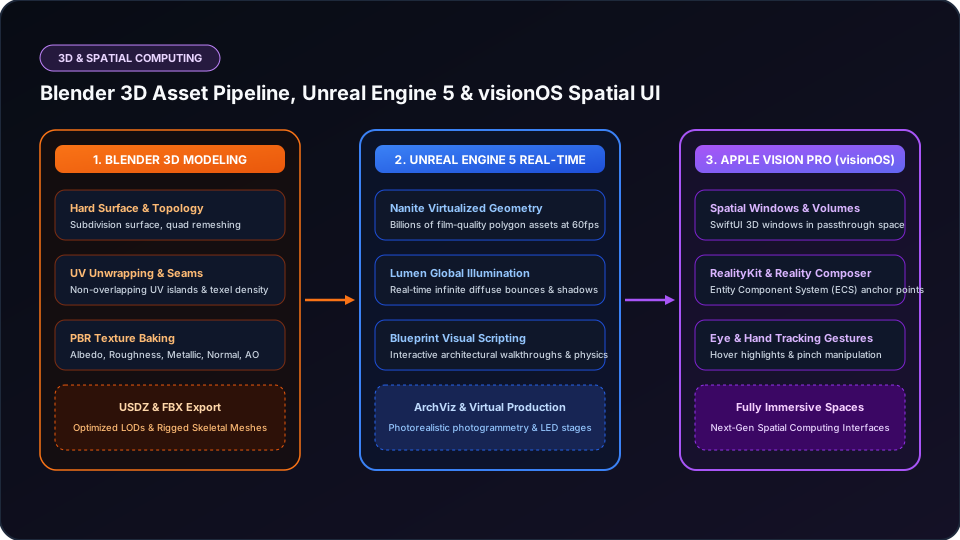
Blender 3D Modeling
Hard-surface quad topology, UV unwrapping, and PBR texture baking exported to clean FBX and USDZ formats.
Unreal Engine 5 Real-Time
Nanite virtualized geometry and Lumen dynamic global illumination rendering cinematic ArchViz at 60fps.
Apple Vision Pro (visionOS)
SwiftUI spatial windows, 3D volumes, and RealityKit interactive anchor points in physical space.
Eye & Hand Tracking
Designing natural spatial interactions triggered by gaze focus and micro-pinch finger gestures.
Structured Phase-by-Phase Syllabus
Focus on build-by-doing milestones rather than passive video consumption.
Phase 1: Blender 3D Asset Pipeline & PBR Materials
- Hard surface modeling, modifiers (bevel, boolean), and clean quad topology
- UV mapping, texel density calculation, and texture baking in Substance/Blender
- PBR material workflows: Albedo, Roughness, Metallic, Normal maps
Phase 2: Unreal Engine 5 Real-Time ArchViz & Environments
- Nanite virtualized geometry import and performance profiling
- Lumen dynamic global illumination, reflections, and post-processing volumes
- Blueprint visual scripting for architectural door triggers, lighting changes, and material swaps
Phase 3: Apple Vision Pro Spatial UI & visionOS Development
- Spatial design principles: Windows, Volumes, and Immersive Spaces in visionOS
- RealityKit entities, RealityView, and USDZ model placement in passthrough AR
- Spatial audio integration and gaze/hand-tracking pinch gesture interactions
Technical Interview Questions & Answers
Q1: How do Nanite and Lumen revolutionize real-time rendering in Unreal Engine 5?
Nanite virtualizes geometry, allowing developers to import film-quality assets with millions of polygons directly into the engine without manual LOD (Level of Detail) authoring; it dynamically scales rendering detail to the pixel level. Lumen provides fully real-time dynamic global illumination and reflections, eliminating the hours previously required to bake static lightmaps.
Q2: What are the three core presentation modes in visionOS for Apple Vision Pro?
The three modes are: 1) Windows (2D planes floating in physical space built with familiar SwiftUI), 2) Volumes (bounded 3D bounded containers presenting volumetric content with RealityKit), and 3) Immersive Spaces (unbounded mixed or fully immersive virtual reality environments taking over the user’s peripheral vision).
Frequently Asked Questions
Do I need a Mac or Apple Vision Pro hardware to learn spatial computing?
Blender and Unreal Engine 5 run smoothly on Windows PCs with modern NVIDIA GPUs (RTX 3060 or higher). visionOS development can be practiced using the official visionOS Simulator in Xcode on macOS.
Which industries are hiring 3D and spatial developers in India?
Gaming studios, real estate luxury ArchViz firms, automotive OEMs (virtual crash tests & digital twins), and enterprise training companies.
Target Job Roles
3D Generalist / Environment Artist
Demand: HighUnreal Engine 5 Real-Time Developer
Demand: Very HighSpatial Computing UI Designer
Demand: HighRelated Career Tracks
Need a Personalized Career Plan?
Take our 20+ Signal Career Compass to assess aptitude and discover suitable roadmaps.
Start Career Compass