UI/UX & Product Design
Product designers shape how humans interact with technology. Master multi-theme design systems in Figma using variables and auto-layout 5.0, create spring-physics micro-interactions in Framer and Rive, conduct qualitative user research and usability testing on Maze, and ensure full WCAG 2.2 accessibility compliance for web and mobile interfaces.

🇮🇳 Indian Market Benchmark
Frontend Layout and Accessibility Lab
Reconstruct a course page using approved design system components. Configure alignment, responsive breakpoints, and ARIA labels.
Core Track Highlights
Figma Atomic Design Tokens & Framer Micro-Interaction Architecture
Hierarchical design system structure spanning primitive global tokens, semantic theming variables, Figma auto-layout components, and Framer interactive state machines.
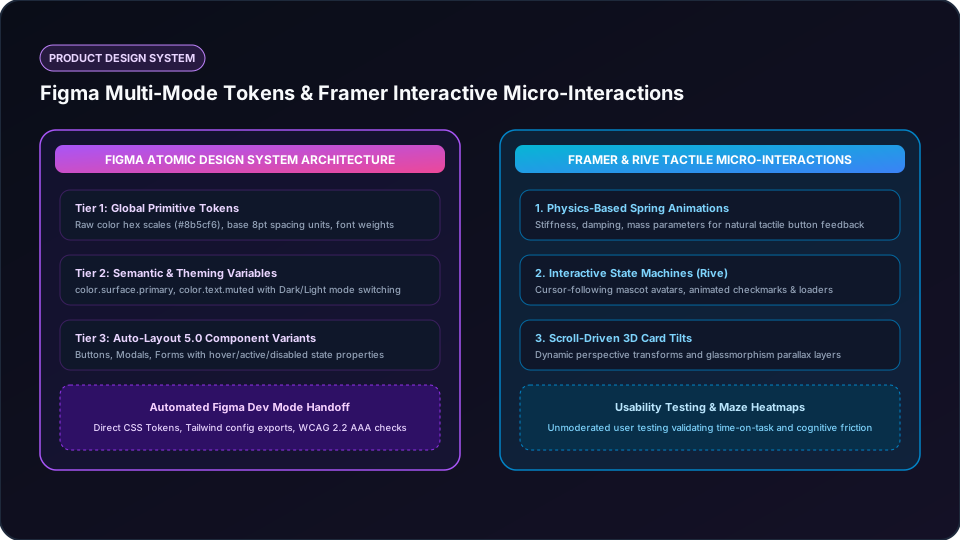
Primitive Global Tokens
Raw hex color palettes, typography scales, and 8pt grid spacing values defined as foundation primitives.
Semantic Theming Variables
Multi-mode variables supporting seamless Dark/Light theme switching and multi-brand white-labeling.
Auto-Layout 5.0 Components
Responsive button, form, and navigation components with hover, active, focus, and disabled variants.
Tactile Framer Physics
Spring-driven micro-interactions, drag gestures, and dynamic state machines providing instant feedback.
Structured Phase-by-Phase Syllabus
Focus on build-by-doing milestones rather than passive video consumption.
Phase 1: UX Research Methodologies & Information Architecture
- User interviews, empathy mapping, and persona synthesis
- Card sorting, user journey mapping, and low-fidelity wireframing
- Usability testing protocols and unmoderated testing with Maze
Phase 2: Scalable Design Systems & Figma Variables
- Figma Auto-Layout 5.0, constraints, component variants, and nested properties
- Design Tokens: Primitive tokens, semantic variables, and Dark/Light mode switching
- WCAG 2.2 AAA accessibility, contrast ratio audits, and Developer Mode specs
Phase 3: Micro-Interactions & Interactive Prototyping (Framer / Rive)
- Physics-based spring animations and tactile button states in Framer
- State machine animations, cursor tracking, and loaders in Rive
- Publishing case studies on Behance, Dribbble, and personal portfolio domains
Technical Interview Questions & Answers
Q1: What is the difference between Primitive Tokens and Semantic Tokens in a Figma Design System?
Primitive tokens represent raw, immutable values (e.g., color-purple-500 = #8B5CF6, spacing-4 = 16px). Semantic tokens assign contextual meaning to those primitives (e.g., color-text-action = color-purple-500, color-background-surface = color-slate-900). Semantic tokens allow the entire product to switch themes (light/dark) or rebrand without altering underlying component structures.
Q2: How do you conduct an effective unmoderated usability test?
Define specific, measurable user goals (e.g. "Complete checkout using UPI"), create realistic prototype flows on tools like Maze, write neutral scenario instructions without leading prompts, and evaluate quantitative metrics (time-on-task, misclick rate) alongside qualitative user feedback recordings.
Frequently Asked Questions
Do I need drawing or illustration skills to be a UI/UX designer?
No. UI/UX design is about problem-solving, information hierarchy, layout systems, user psychology, and component consistency.
How important is a design portfolio versus a formal degree?
A portfolio with 2 to 3 detailed, end-to-end case studies showing your thinking, iterations, and metrics is 90% of what hiring managers evaluate.
Target Job Roles
UI/UX Designer
Demand: Very HighProduct Designer
Demand: Very HighDesign Systems Lead
Demand: HighRelated Career Tracks
Need a Personalized Career Plan?
Take our 20+ Signal Career Compass to assess aptitude and discover suitable roadmaps.
Start Career Compass